How to Set Up an In-App Referral Program: The Full Implementation Guide
 Written by Joran Hofman, Founder of Reditus
Your happiest users already recommend you, in messages and calls you never see. An in-app referral program captures that word of mouth: users share a personal link from inside your product, the people they refer get something for trying you, and the user who referred them gets a reward when it converts. It all happens inside your own product, so every new user can become an advocate in turn.
This is the full implementation guide we share with customers: the two ways to build it (the embedded widget or a fully custom build on the API), the setup steps, double-sided rewards, and the practices that separate programs that produce referrals from programs that just exist.
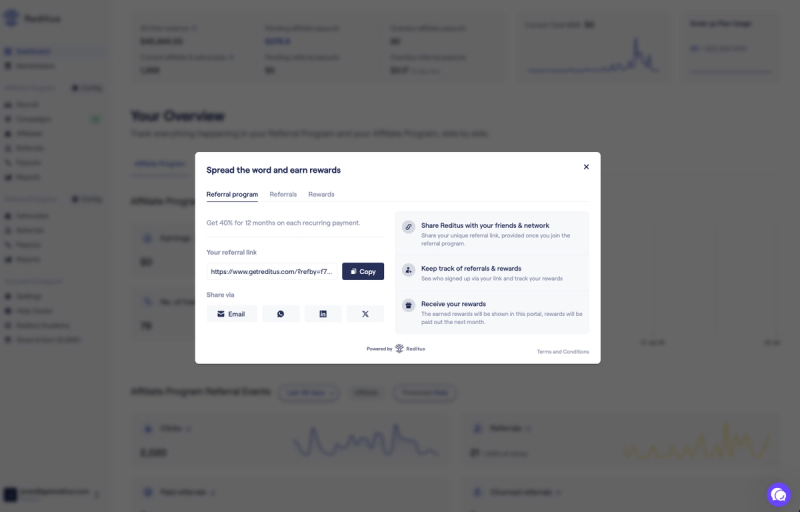
Two ways to build it: the embed or fully custom
Both paths use the same tracking and the same reward logic. The difference is who builds the interface.
Option 1: the embedded widget
The widget is a prebuilt referral interface that renders inside your app. Integration is three steps, documented in the developer guide:
- Load the widget where your frontend has user data, passing your product ID and the user details.
- Authenticate with a JWT generated on your backend, so your product secret never touches the browser and referral activity is tied to the right account.
- Show the modal from any button with a single call, or automatically via a URL parameter, which is handy for opening it straight from an email campaign.
The widget needs very little design work, which makes it the quickest way to launch.
Option 2: fully custom on the Referral Program API
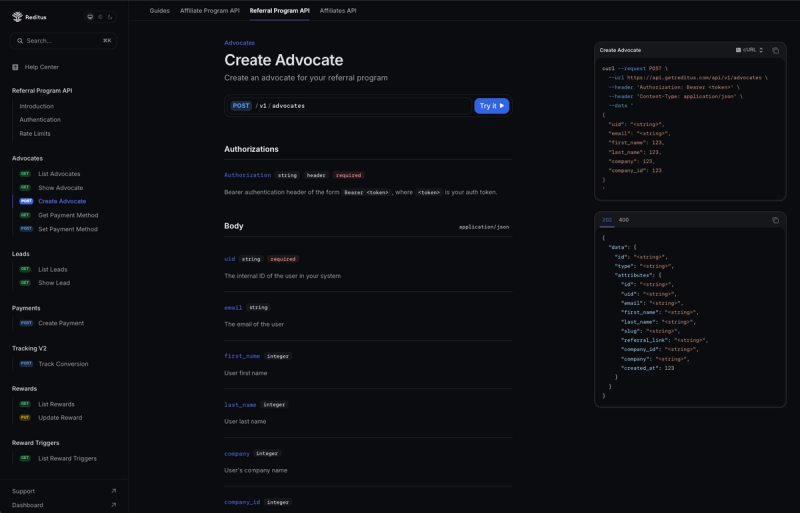
If you want the referral experience to look and behave like a native part of your product, build your own interface on the Referral Program API. You create advocates, read their leads and rewards, track conversions, and trigger rewards, all from your backend, and design whatever front end you want on top.
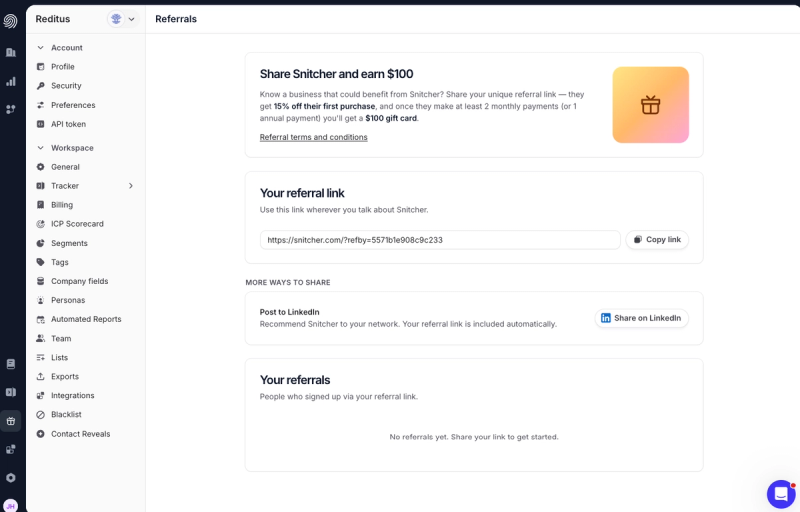
Snitcher built a fully custom in-app referral program on the Reditus API in days and has enrolled 2,600+ advocates. Read how they did it.
Which should you pick?
- Pick the embed if you want to launch quickly: very little design work, with sharing and reward tracking built in.
- Go fully custom if the referral flow must match your design system exactly, or you want referral prompts woven into specific product moments. Expect more developer work than with the embed.
You can also start with the embed and build your own interface on the API later.
The setup, step by step
- Install the tracking script in your site header (guide). It's the same script the affiliate program uses, and it records that a visitor came through a referral link. Wondering about cookie consent? See the FAQ below.
- Add the sign-up snippet at registration (guide), so referred signups are registered to the right advocate. Fire it once, right after a successful signup, on every signup method you offer.
- Connect payments: Stripe natively, or any other processor via the Payments API, so conversions and rewards fire on real revenue.
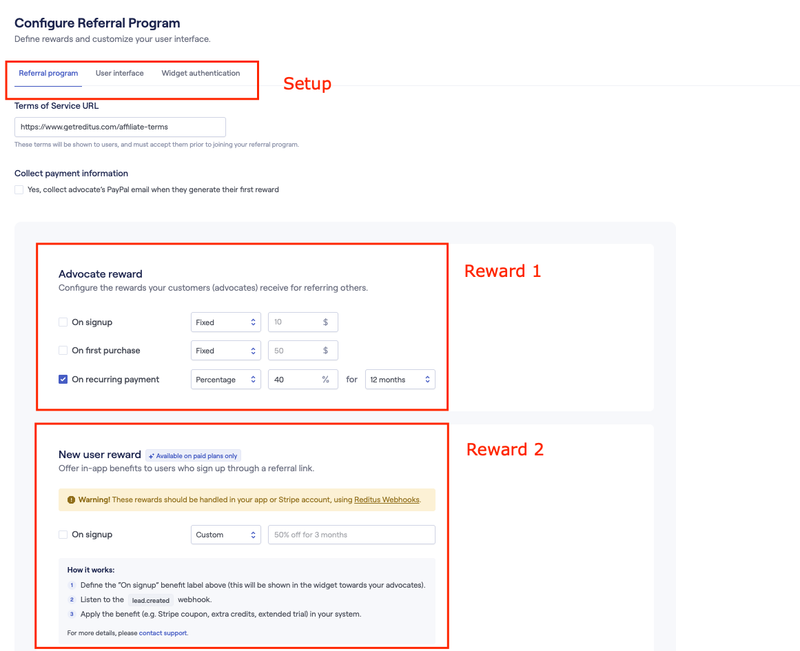
- Configure the program: rewards for the advocate, the incentive for the referred user, and your terms.
- Add the widget or build on the API, as chosen above.
Steps 1 to 3 are the same foundation the affiliate program uses, so if you already run an affiliate program on Reditus, they're done. A typical technical installation takes under 30 minutes.
Double-sided rewards with webhooks
We recommend rewarding both sides: the advocate gets their reward, and the referred user gets a welcome benefit like a discount, extra credits or a longer trial. Rewards don't have to be cash.
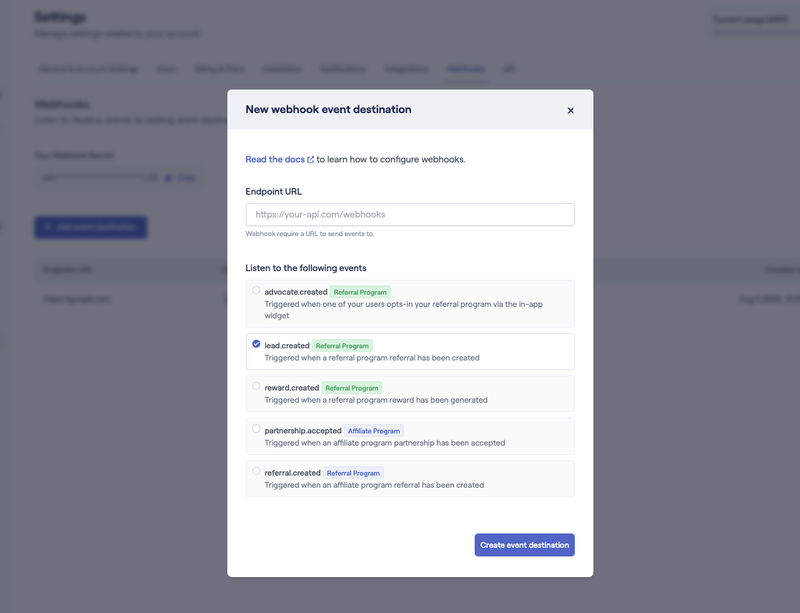
Webhooks make the second side automatic. Subscribe to events like advocate.created, lead.created and reward.created, and apply the benefit in your own system the moment it happens: credits added, discount applied, trial extended, without anyone touching a spreadsheet.
Open the widget from anywhere: deep links
The widget doesn't have to wait for someone to find a button. A link with a URL parameter opens it automatically, on the tab you choose: the Referral Program tab where users grab their link, the Referrals tab or the Rewards tab. The exact parameters are in the widget documentation.
That turns the referral program into something you can promote everywhere you already talk to users: a link in your lifecycle emails, a chat popup or in-app message, a line in your invoice email, a banner after a milestone. One click and the sharing modal is open, pre-authenticated, on the right tab.
Languages
The Reditus app itself is in English only. Your in-app referral program is customizable, so if your own product is translated, you can run your referral flow in those languages too.
Best practices from programs that actually produce referrals
- Reward both sides. Give the referred user a welcome benefit next to the advocate's reward. It makes sharing feel like a favor instead of an ask.
- Make the reward worth a recommendation. Tiny rewards don't get people talking. One Reditus customer pays its users €150 for every new paid client they refer, and it has worked really well for them. Compare your reward with what a new paid client costs you through your other channels, or through an affiliate commission such as 20% for 12 months: a bigger referral reward is often still cheaper.
- Put it where users already are. Top navigation, the settings menu, or a dedicated referrals page. Then use a deep link to open the widget straight from lifecycle emails, chat popups, and in-app messages.
- Ask at value moments. Right after a user gets their first real result, hits a milestone or renews.
- Keep the terms visible and simple. One sentence covering what the advocate earns and what their friend gets, shown inside the widget, beats a linked terms page nobody reads.
- Rewards don't have to be cash. Credits, a longer trial, discounts or extra features work too, and they keep the reward inside your product.
- Announce it more than once. Launch email, in-app mention, and a line in your onboarding sequence. A referral program nobody knows about produces nothing.
- Watch the results, then adjust. If advocates share their link but few referred users sign up or pay, look at the welcome offer first.
Frequently asked questions
How long does implementation take?
A typical technical installation of the tracking (the script, the signup snippet and payments) takes under 30 minutes. The widget then needs the three integration steps above plus your program settings. A fully custom build on the API takes more developer time; Snitcher built theirs in days.
Which plan do I need?
The in-app referral program is part of every paid plan, starting with Growth, with unlimited advocates, and no in-app referral feature is held back for a higher plan. You can set it up during the 14-day free trial; to keep it after the trial, you need a paid plan. See pricing.
Can I run more than one in-app referral program?
No. Each SaaS company has one in-app referral program.
Can the referral program run alongside an affiliate program?
Yes. We recommend launching both together: your users go into the in-app referral program, while agencies, consultants and other partners who reach clients in bulk go into the affiliate program. Both run on one tracking script and one cookie, so the same last-click rule applies between an advocate's link and an affiliate's link.
Do rewards have to be cash?
No. Credits, discounts, extended trials, or anything you can grant via webhooks all work, for the advocate as well as the referred user. If you do pay cash, Reditus pays advocates exactly like affiliates, and we can put both programs on one invoice or send two separate invoices.
Do we need a cookie consent banner for referral tracking?
Typically not. The Reditus cookie only records whether a signup came through a referral or affiliate link and builds no visitor profile. This is based on the opinion of a Dutch lawyer and may not apply in every country (for example Germany), so check your own local regulations. More in why you typically don't need to ask for cookie consent.
Where do I find the developer documentation?
The full integration guide, including the widget walkthrough, JWT authentication examples and the API reference, starts at docs.getreditus.com/referral-program/get_started.
Evaluating referral software for your SaaS?
If you are reading this while choosing tooling rather than implementing it: Reditus runs the in-app referral program and a full affiliate program on one platform, with a network of 28,000+ B2B SaaS affiliates on top. Book a demo and we will walk through your setup, embed or fully custom, or start a 14-day free trial and set up the widget yourself.
Related reading
- The strategy behind referral programs: what to offer, why double-sided rewards win, and the three reasons programs produce nothing.
- What an in-app referral program is, if you are still deciding whether you need one.
- Referral program vs affiliate program and whether to start with referrals or affiliates first.
- Referral program best practices and the benefits of running one.
- Running referrals and affiliates together, which is the standard Reditus setup.
- Something not working? Troubleshooting your in-app referral program.